
If you are working at home either through this pandemic, or maybe into the longer term future, you may be finding that your body is feeling less comfortable than it used to be. Maybe your shoulders or your back has started to ache or your hips feel stiffer than usual. This is especially likely if you are spending long hours at a computer as a part of your work.
There are likely to be several reasons for this. The first, and most obvious, is the way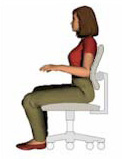 that your workstation is organised. If you are working on the dining room table, or squeezed into a space in your bedroom you may not have the ideal set up, like you did when you were working in the office. There’s lots of information on the web about getting the most ergonomic set up for yourself. This entails getting your keyboard and monitor at the right height and getting a chair which gives you back support, allows you to adjust for your working height, back and arm support and even tilting your position. Find out more about getting the right working set-up.
But even if you have sorted out all of those variables there are others that may still come into play. For example, if you use a mouse or a trackpad you may find that your mouse shoulder starts to ache. This happens because to your shoulder is constantly having to take the weight of your hand as you move the mouse. Check it out for yourself. Sense how when you have to move the mouse or run your fingers over the trackpad you are having to lift, ever so slightly, the weight off your hand, otherwise you can’t move the mouse. Doing this for long periods of time puts a habituated contraction on the shoulder muscles which ultimately leads to pain.
To help with this you might try using a trackerball. Like the Logitech Marble Mouse where you can actually rest your hand on the desk as you move the ball which can remove the strain on your shoulder.  The Marble Mouse also lets you regularly swap the trackerball to your other hand. Although this might sound impossible, after a short while your brain accommodates the new position and it’s surprising how quickly you get used to it. Remember though to change the settings on your computer from left to right, otherwise the mouse or trackerball keys will be the wrong way around! There are a wide variety of trackerballs to choose from, although most are designed to be only left or right handed and not swappable.
The other thing to notice, is how very slightly you may lean into your mouse hand side. This leads to habitually contracted waist and hip muscles. Keeping the mouse close to the keyboard will reduce this lean, and also using a smaller keyboard, perhaps one without a keypad. Unless you are doing a lot of number crunching, how often do you use a keypad?
Your sitting posture is key here. Have you noticed how you tend to lean forward into your screen, perhaps jutting you chin forward putting an ongoing strain on your neck and upper back muscles and even your larynx. The more involved you get in the task in hand the more that’s likely to happen. This doesn’t only affect your neck and shoulders, because the lean also gently contracts the abdominal muscles.
We all know we should sit upright and it’s very tempting to start making adjustment to do this. You might try stiffen your upper back, pulling your shoulders back to take the strain off your lumber, or low back. But this means you start to use muscles that were not designed for the work you are giving them. What happens? Well after a while they start to tire and complain so you start getting pains in new places.
Prolonged sitting also habitually contracts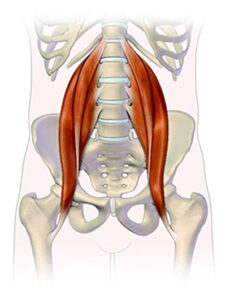 the big psoas muscle which links our lower spine to our hip and groin. Have you noticed after sitting for a long time how you need to straighten up carefully when you stand, maybe your back is complaining as well. It’s because you are making the contracted psoas lengthen out again as you stand.
These are all, in somatic terms, what are called the Red Light reflex. The tightened abdominal muscles, leading to a rounded back and tight psoas muscles, chin jutting forwards, and rounded shoulders. This reflex also puts a pressure on the internal organs of the stomach and bladder which are constricted in this position.
So what can you do to alleviate, or avoid these problems? The most obvious is to make sure your working set up reduces as many of those problems as possible. You might even explore a rising desk so that you can stand and work as well as sit. Alternating between the two can alleviated many of the above problems.
Make sure also that you take regular breaks, at least every hour. There are software timers that you can run on the computer to remind you to stand at regular intervals, but make sure you don’t ignore them because you are so engrossed in what you are doing.
The best option however is to become aware of what you body is telling you and to include some regular somatic movements into your daily schedule that will start to address the postural issues of computer working. These can be done lying down or even as you sit at the computer, and don’t just do them at home. When you get back to the office carry your new habits with you into the work place. You may find many of your colleagues suffer the same issues as yourself.
If you think you may need help with these issues a Somatics class, or a certified Clinical Somatics Educator can give you advice on which somatic movements to use and how to get the best from them.
The Somatic Flower movement is a beautiful somatic movement that starts to address Red Light problems and creates a great release in the centre of the body, the back and shoulders.
- See my notes for The Flower
- Watch Martha Peterson demonstrating the Flower.
